

Subtitle Tool
Subtitles for language learning. Find them, sync them, or make them from the audio, then read the original and your own language together.
Beta · v0.0.1macOS · Windows · LinuxFree, MIT licence
What it does
- 🔎 FindSearches OpenSubtitles for your movie, by file fingerprint and title.
- 🎯 SyncLines subtitles up with the audio, even when they came from a different release.
- ✨ MakeWrites subtitles from the audio with Whisper, on your own computer. Nothing is uploaded.
- 🌍 TranslateTranslates to Finnish or any other language with DeepL or Google.
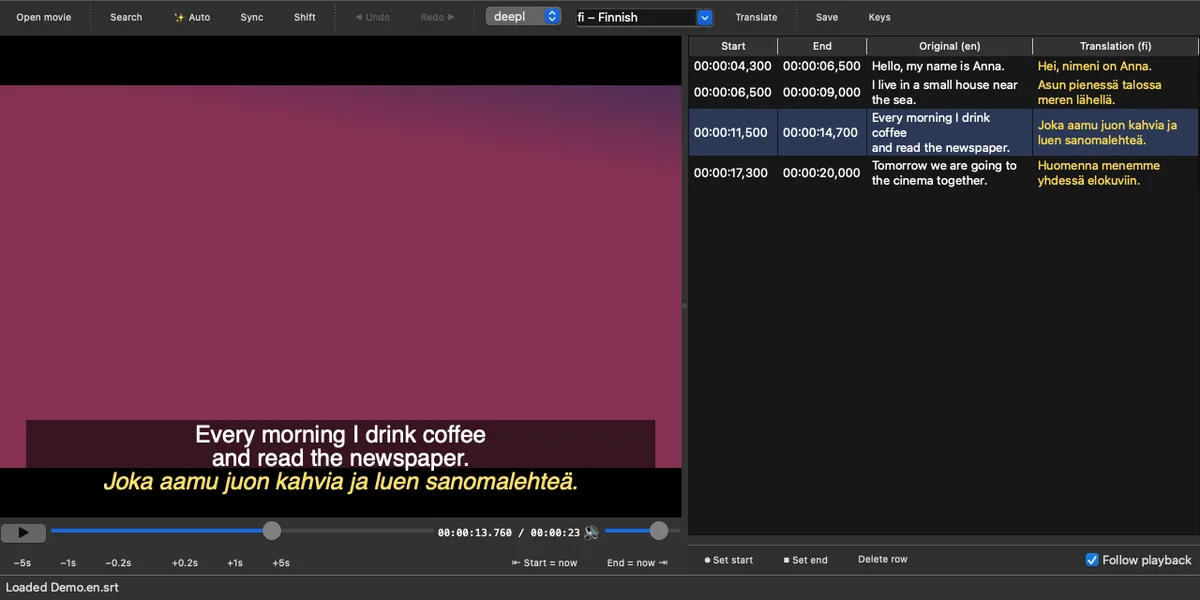
- 📚 Show bothThe original in white with the translation in yellow underneath, for learning.
- ✏️ EditFix, retime or write lines by hand in a simple built-in player.
Everything is saved as normal .srt and .ass files next to the video, so VLC, IINA, mpv or Plex can show them. The tool never downloads movies.
Download
All releases on GitHub · Source code
First launch: the apps aren't signed yet, so your computer will warn you once. On macOS, right-click the app and choose Open. On Windows, click More info → Run anyway. On Linux, make the AppImage executable with chmod +x.
Testing it for me
Thanks for trying it! Ten minutes is plenty. These steps cover the main features:
- Open a video. Any movie file or a short clip of your own works. Subtitles already sitting next to it load automatically.
- Try ✨ Auto. Pick the small model. The first run downloads it once (about 480 MB), then the list fills with subtitles as it listens.
- Translate. Click Translate to fill the Finnish column. For the best quality, add a free DeepL key under Keys… (deepl.com/pro-api).
- Search and Sync (optional). With a free OpenSubtitles key (opensubtitles.com/consumers), search for the movie and press Sync.
- Edit a line. Double-click a line, change it and press Enter. Space plays and pauses.
- Watch the result in VLC or another player using the
.en-fi.srtfile saved next to the video.
Then tell me what broke, what was confusing and what you liked. Your system (for example "Windows 11" or "MacBook Air M2") and a screenshot help a lot.